How to See Who Doesn’t Follow You Back on Instagram: 7 Free Methods (2026)
You followed 400 people, but only 250 followed back. The rest sit in your Following list doing nothing: they clutter your feed, they never engage with your posts, and they quietly pull your engagement rate down. Instagram does not give you a button that lists who does not follow you back, but you do not need one. The app already exposes everything you need through the Follows you badge, the Followers search bar, the Least Interacted With sort, and the official Meta data export. This guide walks you through seven free methods to see who does not follow you back on Instagram, from a 10 second check on a single profile to a full spreadsheet comparison of your entire following list, plus which unfollow checker tools and follow back apps are actually safe to use in 2026.
The Short Answer
Instagram has no native feature that hands you a list of accounts that do not follow you back. There is no non-followers tab and no unfollower alert. Your options are: (1) open your Following list and check each profile for the Follows you label, (2) search your own Followers list for a specific username, (3) use Instagram’s built-in Least Interacted With sort to shortlist likely one way follows, or (4) download your official Instagram data export and compare the two lists. Third party unfollower apps can produce a list faster, but they carry real account and privacy risks, which are covered honestly in Method 6 below.
What “Does Not Follow You Back” Actually Means
Before you start checking, it helps to know that non-followers fall into three different buckets, because the fix for each one is different:
- Never followed you. You followed them, they never reciprocated. This is normal for celebrities, big brands, meme pages, and anyone with a huge audience who simply does not follow people back individually. No hard feelings, that is just how those accounts operate.
- Used to follow you, then unfollowed. They followed you at some point and later dropped you. This could have happened yesterday or three years ago. If you specifically want to catch people who unfollowed you over time, you need dated snapshots of your follower list, not a one time check.
- Blocked, deactivated, or restricted you. The account may still sit in your Following list while no longer being able to appear as a follower. These accounts also show up as non-followers in any comparison, so do not be surprised by a few odd entries.
A standard non-follower check shows the current state only. It cannot tell you which bucket someone falls into or when a follow-back disappeared. Keep that in mind when you look at the results, especially before you start unfollowing people.
Non-Followers vs Ghost Followers vs Fans: Do Not Mix These Up
People use these terms interchangeably, but they describe three different groups, and mixing them up leads to bad cleanup decisions:
- Non-followers are accounts you follow that do not follow you back. This is the group this whole guide is about. They affect your feed and your following count.
- Ghost followers are accounts that follow you but never like, comment, or watch your stories. They affect your engagement rate because they inflate your follower count without interacting. Removing ghosts is a different job from removing non-followers, and the two lists barely overlap.
- Fans are accounts that follow you while you do not follow them back. These are often your most valuable connections: engaged audience members, potential customers, or people who discovered you through search. Never confuse fans with non-followers during a cleanup. The ZIP upload tools in Method 5 label all three groups separately precisely so you do not make this mistake.
A common error is exporting only one list and assuming every unfamiliar name is a problem. Always work from both lists side by side. An account that looks like dead weight in your Following list might be a fan who engages with every post, and an account in your Followers list might be a ghost dragging your engagement rate down. The labels matter because the action for each group is different: trim non-followers for feed quality, remove ghosts for engagement rate, and engage fans to convert them into community.
Why People Check Who Does Not Follow Them Back
For most people it starts as curiosity, but there are legitimate strategic reasons to audit your following list:
- Engagement rate protection. Engagement rate is roughly likes plus comments divided by followers. A following list full of one way follows does not hurt this directly, but the habit of following hundreds of accounts that never engage back usually correlates with a feed and network full of passive connections. Creators who keep their network mutual tend to see healthier interaction numbers.
- Feed quality. Every account you follow competes for space in your feed. Accounts that never followed you back and never interact with you are usually the same accounts whose posts you scroll past. Removing them makes your feed relevant again.
- Credibility for brands and creators. A profile that follows 7,500 people but is followed by 900 looks like a follow-for-follow account. A tighter, more mutual following list looks more professional to potential collaborators, sponsors, and new visitors.
- Spotting follow-for-follow drops. If you participated in follow trains, engagement groups, or follow-for-follow threads, some accounts follow you just long enough for the follow-back and then quietly unfollow. A periodic non-follower check makes these drops visible.
Method 1: Check the “Follows You” Badge (Most Accurate)
This is the only method that is both 100 percent accurate and 100 percent inside Instagram’s rules. Every profile on Instagram shows a small Follows you label directly under the username when that account follows you. No label means they do not follow you back.
Steps
- Open Instagram and go to your profile, then tap Following.
- Tap any account from your following list to open its profile.
- Look directly under the username, next to the Follow or Following button. If you see the grey Follows you text, they follow you back. If it is missing, they do not.
- Go back and repeat for the next account you want to check.
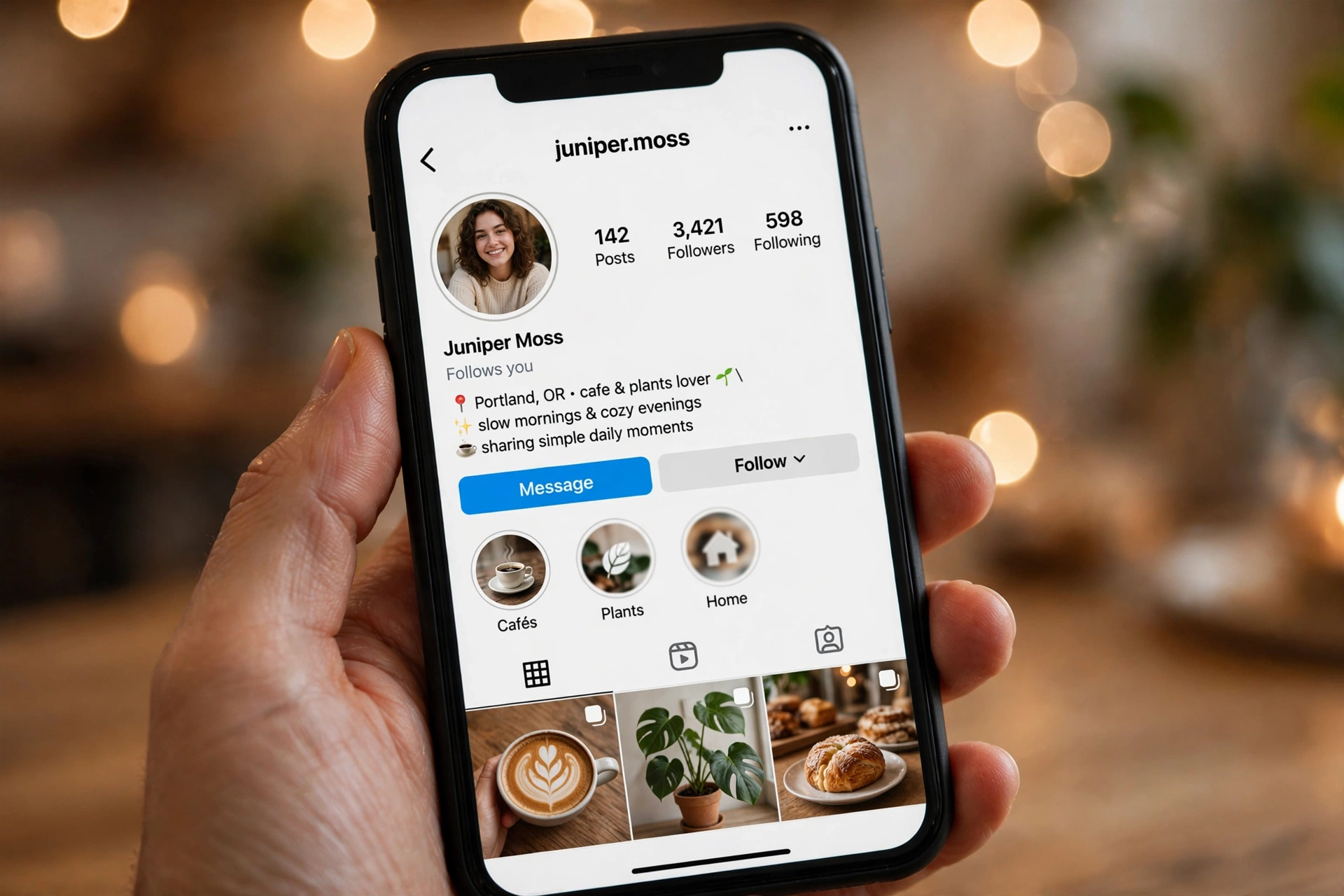
Pros: Free, official, real time, zero risk to your account, works on any account size.
Cons: One profile at a time. Checking a list of 2,000 accounts this way would take hours, so reserve it for verifying specific people or confirming shortlists built with the faster methods below.
Speed tip: You do not need to check everyone. Use Method 3 to shortlist the accounts most likely to be one way relationships, then verify only those profiles with the badge. This combination gives you the accuracy of the manual check without the grind.
Method 2: Search Your Followers List (Fastest for One Person)
When you only want to check whether one specific person follows you back, perhaps a friend, a client, or a business contact, this takes about ten seconds and the other person is never notified.
Steps
- Open Instagram and go to your profile.
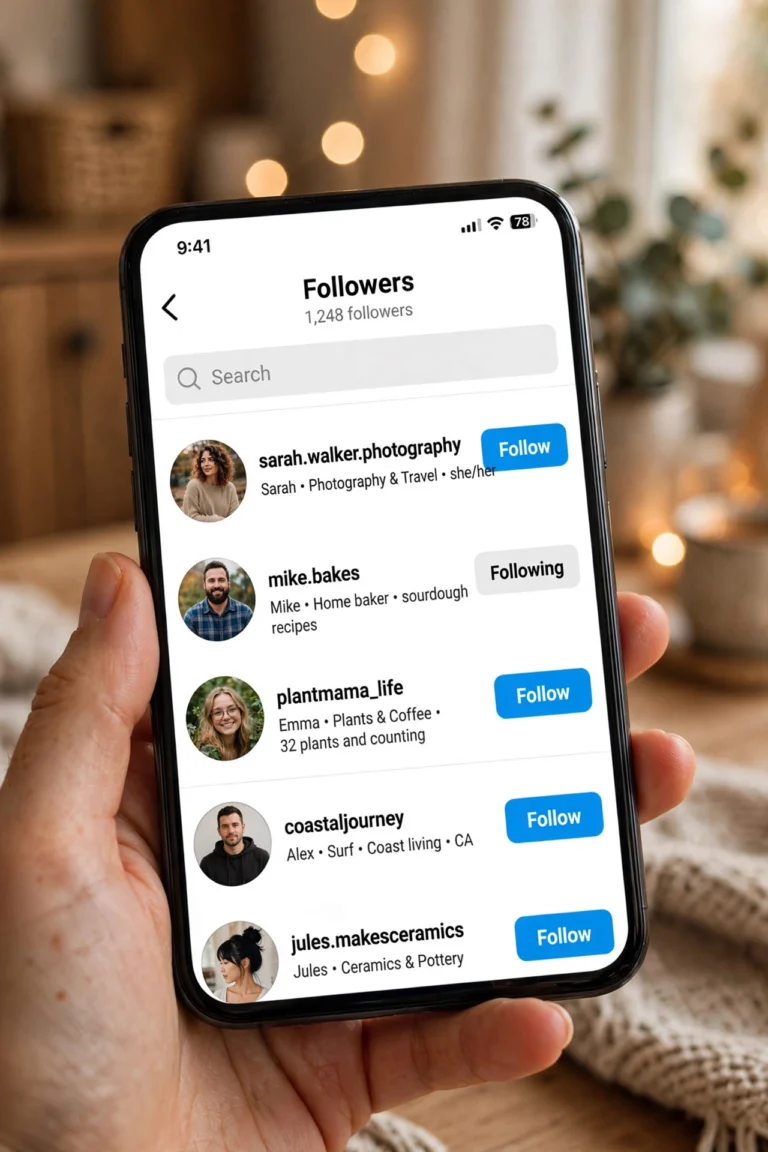
- Tap Followers at the top of your profile.
- Type their username or display name into the search bar at the top of the list.
- If they appear in the results, they follow you. If the search comes up empty, they do not follow you back (or they blocked or restricted you, which is worth ruling out).
This works no matter how many followers you have, because you are searching Instagram’s own complete list rather than scrolling it. It is the most reliable single profile check after the badge method.
There is a related trick people mention: the Follow back button. If you open someone’s profile and the button under their bio says Follow back, they follow you but you do not follow them. If it just says Follow, they do not follow you. The catch is that if you already follow them, the button says Following, which tells you nothing about their side. You would have to unfollow them first to reveal the real button, and on a private account that kicks you out until they re-approve you. For anyone you already follow, stick with the Followers search instead.
Method 3: Use the “Least Interacted With” Sort (Best Native Shortcut)
This is the closest thing Instagram offers to a built-in non-follower filter, and most guides miss it. Your own Following tab has a sort control that ranks accounts by how little you have interacted with them over roughly the last 90 days. Accounts that never followed you back and that you never engage with tend to cluster at the top of this list.
Steps
- Open your profile and tap Following.
- Tap the small sort icon (the dual arrow control) next to Sort by Default at the top of the list.
- Choose Least Interacted With. Instagram reorders the list to show the accounts you have engaged with the least first.
- Work through the top of the list, tapping into profiles and confirming with the Follows you badge from Method 1.
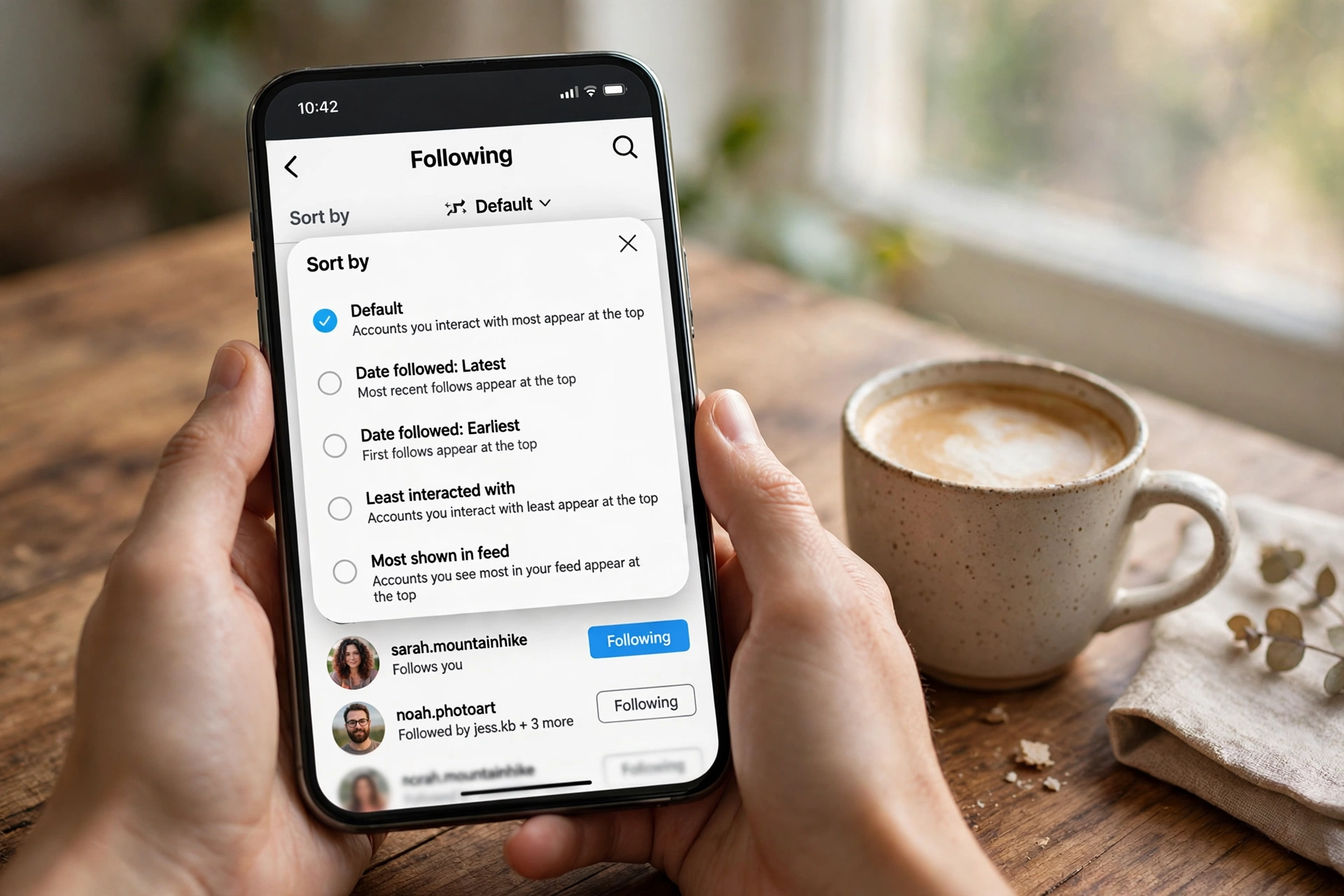
Why this helps: It is not a literal does-not-follow-back filter, and Instagram never claimed it was. But in practice, the overlap is strong: one way, low value follows are exactly the accounts you interact with least. It is completely safe because it uses Instagram’s own sorting, no third party involved.
Limitation: Mutual friends you simply do not engage with much will also appear here, so always verify with the badge before unfollowing anyone. The sort is a shortlisting tool, not a verdict.
The same sort menu also offers Most Shown in Feed and Date Followed ordering. Date ordering is useful when you want to audit a specific follow spree, for example accounts you followed during a giveaway or a follow-for-follow thread last month. Sort by latest first and check that batch specifically.
Method 4: Instagram Data Export (Safest Full List Check)
If you want the entire list of accounts that do not follow you back, not just a shortlist, the official Instagram data export is the gold standard. It comes straight from Meta’s own servers, so it is perfectly accurate, it requires no password sharing, and it cannot get your account flagged. The trade off is time: you have to request the file, wait for Instagram to prepare it, and compare two lists yourself.
How to request your data on mobile
- Open the Instagram app, tap your profile icon, then the hamburger menu (three lines) at the top right.
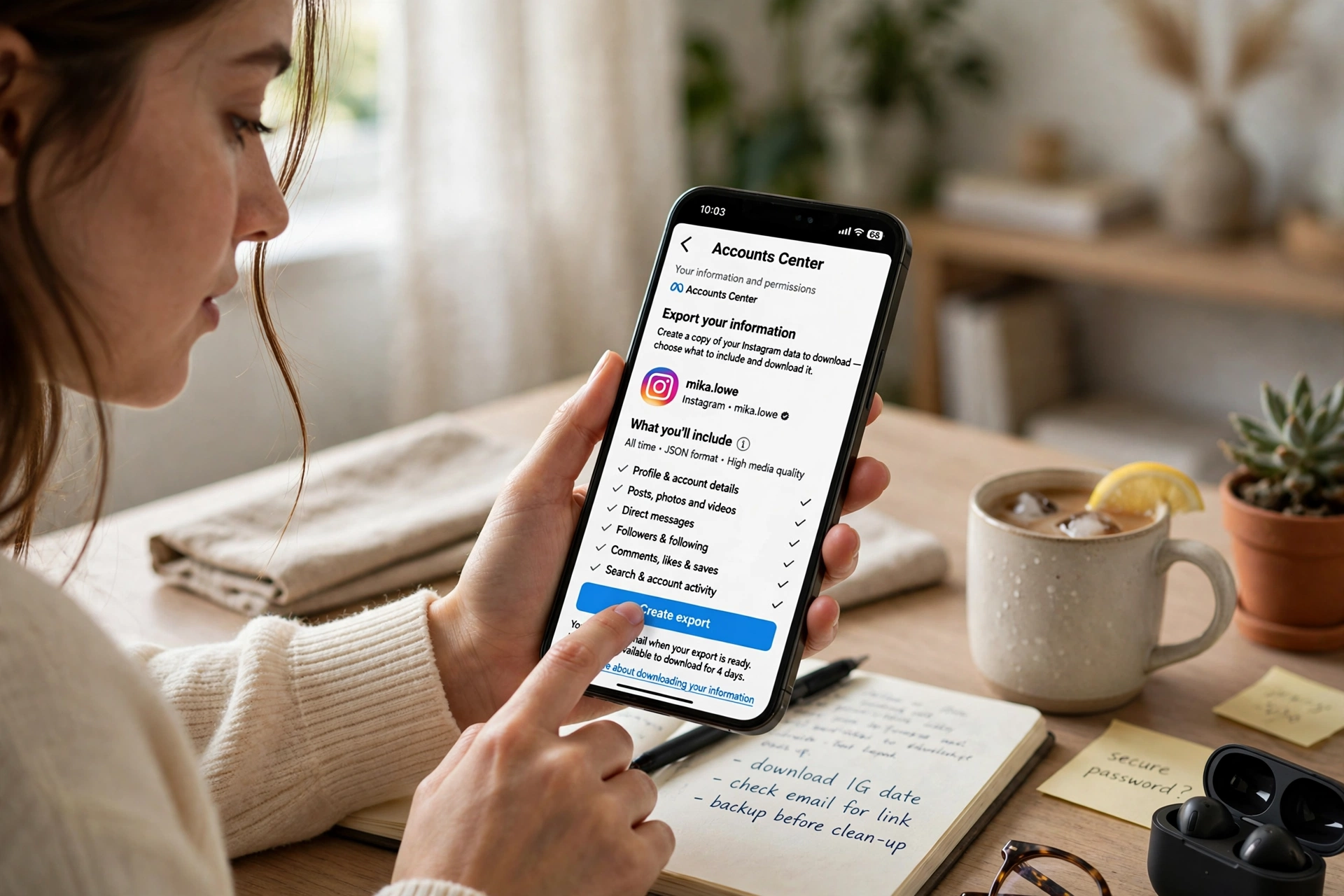
- Go to Settings and privacy, then Accounts Center.
- Tap Your information and permissions, then Download your information.
- Select your Instagram account, choose Some of your information, and tick Followers and following (selecting only this keeps the file small and fast).
- Choose JSON format and the All time date range, then submit the request.
How to request your data on desktop
- Go to instagram.com in a browser and log in.
- Click your profile photo at the top right, then Settings.
- In the left menu, open Privacy and Security (or go through the Meta Accounts Center to Your information and permissions).
- Find Download your information, select followers and following data in JSON format, and request the download.
Instagram emails you a download link, usually within 15 minutes to a few hours, though large accounts can wait up to a couple of days. Download the ZIP, unzip it, and look for the followers and following files (typically followers_1.json and following.json, or HTML equivalents if you chose that format).
Comparing the two lists in a spreadsheet
Once you have both lists, the comparison is straightforward:
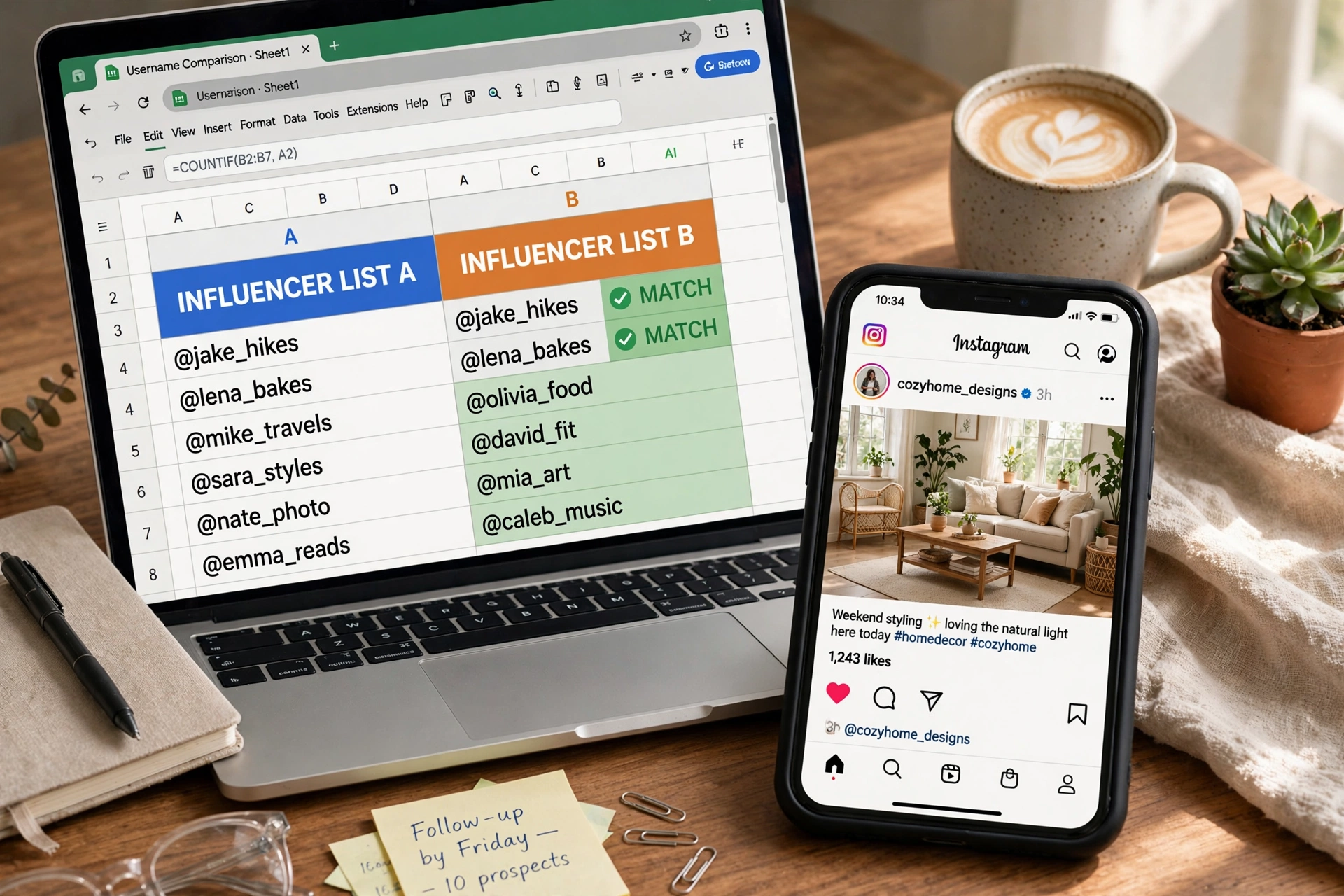
- Open the followers file and copy every username into column A of a spreadsheet. Open the following file and paste every username into column B.
- In column C, next to the first username in column B, enter a formula like =COUNTIF(A:A, B1). A result of 0 means that account is in your Following list but not in your Followers list: a non-follower.
- Drag the formula down the whole column. Filter column C for zeros and you have your complete non-follower list, ready to review or save for next time.
Pros: Official, free, fully accurate, no third party sees your data, and you keep a dated snapshot you can compare against future exports to see who unfollowed you over time.
Cons: Waiting for the export, plus a little spreadsheet work. If you want the comparison done for you without touching a formula, Method 5 automates exactly this step.
If the export gets stuck: retry later from the same menu, since Instagram queues large exports; request JSON instead of HTML because it is lighter; use a desktop browser on stable internet; and check your spam folder for the download email. If exports keep failing, the manual list comparison in Method 1 still works fine.
Running this export every month or two is also the backbone of serious follower tracking. If you want ongoing insight into follower growth, drops, and ghost accounts rather than a one off check, a dedicated instagram follower tracker workflow built on these same exports gives you the trend view Instagram itself never shows.
Method 5: No-Login ZIP Upload Web Tools (Fastest Safe Bulk Check)
Several free web tools do the spreadsheet comparison for you, right in your browser, without asking for your Instagram login at all. You upload the data ZIP from Method 4, the tool reads it locally in your browser, and it instantly shows your non-followers, fans (people who follow you but you do not follow back), and mutuals. Nothing is sent to a server and no password changes hands.
Steps
- Request and download your Instagram data ZIP using Method 4 above.
- Open a no-login comparison tool such as Folozer, Nonfollowers.com, Unfollow Radar, or Unfolks in your browser.
- Drag and drop the ZIP file onto the page. The comparison runs locally on your device.
- Read your lists immediately: non-followers, fans, mutuals, and totals, usually with a CSV export option so you can track changes between exports over time.
Why this is the recommended 2026 option: it combines the accuracy of the official export with the speed of an app, while keeping your credentials completely out of the picture. It works for accounts of any size, from a few hundred follows to tens of thousands, and finishes in seconds once the ZIP is ready.
One caution: only use tools that process the file locally and explicitly promise no login. Any site that asks for your Instagram username and password to “analyze” your account is a different category entirely: that is Method 6 territory, with all its risks.
Method 6: Third Party Unfollower Apps (Convenient but Risky)
Dozens of apps in the App Store and Play Store promise an instant list of who does not follow you back: FollowMeter, Followers Tracker Pro, Follow Cop, and InstaFollow are the names that come up most. They are convenient, but this is the one method where you need to understand the trade offs before you tap install.
The risks, honestly
- Terms of service violations. Instagram’s terms prohibit accessing the platform through unauthorized automated means. Many unfollower apps scrape follower data or automate follow and unfollow actions, which is exactly the behavior those terms target.
- Action blocks and restrictions. When an app performs rapid automated actions on your behalf, Instagram’s systems can read it as spam and respond with a temporary action block (you cannot follow, like, or comment for hours or days) or a broader account restriction. The app gets you the list; your account absorbs the penalty.
- Credential theft. Some apps still ask you to type your Instagram username and password directly into their own screen instead of using an official login flow. That password can be stored, leaked, or used to take over your account. Never enter your Instagram password into an app that is not Instagram or an official Meta login page.
- Stale data and paywalls. Instagram restricts how much follower data third party apps can pull and how often, so reports are frequently snapshots from hours or days earlier, not real time. Most free versions are ad heavy or gate the actual non-follower list behind a subscription of roughly $5 per month.
The most mentioned apps, briefly
- FollowMeter (iOS and Android): tracks non-followers, unfollowers, ghost followers, and engagement metrics. Basic tier free, full features on subscription.
- Followers Tracker Pro (iOS only): focused unfollower and non-follower tracking with a clean native interface, subscription based.
- Follow Cop (Android only): identifies recent unfollowers and never-followed-back accounts, with limited mass unfollow in the free tier.
- InstaFollow (iOS and Android): lists new followers, unfollowers, non-followers, and story viewers with follower reports, free with paid upgrades.
If you use one anyway: prefer apps that connect through Instagram’s official login flow (OAuth) and never ask for your raw password, review exactly which permissions they request, keep automated follow and unfollow actions switched off, and revoke the connection afterward under Settings and privacy, then Apps and websites. For a deeper breakdown of what these tools can and cannot do safely, see our instagram unfollow checker guide.
Method 7: Browser Extensions and Web Dashboards (Use With Caution)
A smaller category of tools works as browser extensions or web dashboards that read your follower data while you are logged into Instagram on desktop. In theory they save you the export step. In practice, they sit in the same risk zone as Method 6: anything that automates actions or scrapes data through your logged in session can trigger the same action blocks, and extensions can read far more of your browsing than they need.
Our position is simple: if you have already done the two minute setup of Method 4 plus Method 5, you get the same result with none of the risk. Extensions are only worth considering if you audit followers daily for work, and even then, a throwaway workflow with revoked permissions afterward is the only sane way to use them. Never grant an extension permission to read data on all websites for a follower check; that is far broader access than the job requires.
All 7 Methods Compared
Pick the method that matches your situation rather than defaulting to an app:
| Method | Cost | Speed | Accuracy | Safety | Best for |
|---|---|---|---|---|---|
| Follows you badge check | Free | Slow (one by one) | 100% | Perfectly safe | Verifying specific people |
| Followers list search | Free | 10 seconds per person | 100% | Perfectly safe | Checking one person fast |
| Least Interacted With sort | Free | Minutes | Shortlist, not verdict | Perfectly safe | Finding likely one way follows |
| Instagram data export + spreadsheet | Free | Slow (wait for ZIP) | 100% | Official and private | Full list, historical tracking |
| No-login ZIP upload tools | Free | Fast after ZIP | 100% | Safe (local processing) | Recommended bulk check |
| Third party unfollower apps | Free tier, then paid | Instant | Often stale | Risky | Convenience seekers who accept risk |
| Browser extensions | Mostly free | Instant | Varies | Risky | Daily auditors, with caution |
How to Catch People Who Unfollow You Over Time
A one time non-follower check tells you the current state, but it cannot tell you who unfollowed you last week. For that you need history, and the data export method gives you a clean way to build it yourself:
- Save each export with a date. Every time you run Method 4, keep the ZIP in a folder named by date, for example instagram-data-2026-10. These are your snapshots.
- Keep the non-follower list from each run. Whether you use the spreadsheet formula or a ZIP upload tool’s CSV export, save the resulting non-follower list alongside the ZIP it came from.
- Compare snapshots. Open last month’s non-follower list next to this month’s. Names that appear now but did not appear before are accounts that unfollowed you (or that you followed) since the last snapshot. Names that disappeared either followed you back or were removed.
- Repeat monthly. A monthly cadence is enough for most people. Weekly checks create noise, because normal follow churn makes every comparison look dramatic. Monthly snapshots show real trends: follow-for-follow drops after a campaign, a slow bleed of inactive accounts, or a sudden batch unfollow worth investigating.
This dated-snapshot workflow is exactly what paid unfollower apps sell you as “unfollower history,” except you are doing it with official data, for free, with zero account risk. The only thing it costs is the discipline to save each export. Set a monthly reminder and the history builds itself.
One limitation to know: Instagram’s export reflects the moment it was generated, and very recent follows or unfollows can take a short while to appear consistently across the files. If a name looks surprising in a comparison, re-verify it with the Follows you badge before acting on it.
Notice the pattern: every method that is instant and effortless carries risk, and every method that is perfectly safe requires a little of your time. There is no magic option that is both instant and risk free, no matter what an app’s marketing claims.
How to Safely Unfollow People Who Do Not Follow You Back
Finding non-followers is only half the job. If your goal is to trim them, do it at a human pace. Instagram does not publish exact numbers, but unfollowing large batches in a short window is a classic trigger for a temporary action block, and newer accounts have tighter tolerances than established ones.
A safe unfollow routine
- Shortlist first. Use the Least Interacted With sort or a ZIP upload tool to build your candidate list. Do not unfollow straight from a third party app’s list without verifying.
- Verify each profile. Tap in and confirm there is no Follows you badge. This ten second check prevents embarrassing mistakes, like unfollowing a client or collaborator whose follow-back you simply missed.
- Keep the accounts you value. Friends, creators you learn from, potential business contacts, local businesses: keep them even if they never follow back. The goal is a relevant feed, not a perfect ratio.
- Pace yourself. Spread unfollows across the day instead of doing them in one sitting. A conservative rhythm is a few dozen per day for newer accounts and up to around 150 per day for older, well established accounts. Stop immediately if Instagram shows an “Action Blocked” message and wait it out; pushing through a block extends it.
- Watch for the block signals. If likes or comments suddenly stop working alongside unfollows, Instagram has flagged the session. Log out of any third party tools, wait 24 to 48 hours, and resume manually at a slower pace.
Instagram does not notify anyone when you unfollow them. They can only notice if they check their own follower count or list, so the cleanup is silent on their end. If you are planning a large cleanup, read up on mass unfollow instagram pacing and limits first, because that is exactly where most action blocks happen.
Should You Unfollow Everyone Who Does Not Follow Back?
Honestly: no. Chasing a perfect follow-back ratio is one of the least productive things you can do on Instagram, and aggressive pruning often does more harm than the imaginary benefit.
- There is no official ideal ratio. Instagram has never published a target follower-to-following ratio, and the algorithm does not reward you for hitting one. A 1:1 ratio is a vanity metric.
- You lose discovery. Following interesting accounts, even ones that never follow back, is how you discover trends, collaborators, and ideas. A feed pruned down to mutuals only gets stale fast.
- Relationships are asymmetric by nature. You follow news outlets, brands, creators, and public figures for their content, not for a follow-back. That is healthy usage, not a vanity problem to fix.
- Unfollowing can cost you later. That small brand that does not follow you back today might be a collaboration partner next year. Keep follows that have professional or learning value regardless of reciprocity.
The right question is not “who does not follow me back” but “which follows still add value to my feed and my goals.” Unfollow the dead weight, keep the valuable one way follows, and spend the saved energy on the next section instead.
How to Get More People to Follow You Back
Hunting non-followers only fixes half the problem. The other half is being worth following back in the first place. These six levers move the needle far more than any cleanup:
1. Make your profile follow-worthy at a glance
Most follow-back decisions happen in under five seconds on your profile. A clear profile photo, a searchable name field with a relevant keyword, and a bio that says what you post and who it is for will beat any trick. Pair that with fresh, well written classy captions for insta style copy on your posts, because visitors do read captions when they are deciding whether your content is their taste.
2. Post consistently, and lead with Reels
A posting rhythm of three to five times per week signals reliability to both the algorithm and human visitors. Reels dominate discovery reach right now, so they are your best tool for reaching people who do not follow you yet. Carousels deepen the connection with people who already found you, and Stories keep you visible daily to existing followers.
3. Engage before you expect engagement
Follow-backs are reciprocal by psychology. Reply genuinely to comments and DMs, leave thoughtful comments on posts in your niche instead of emoji drops, and use Story polls and Q and A stickers to start conversations. People follow back accounts that already feel like a two way relationship. Creators who treat engagement as a daily habit consistently report higher follow-back rates than those who post and vanish.
4. Use hashtags and geotags strategically
Three to eight well chosen hashtags per post, mixing niche tags with a couple of broader ones, put your content in front of people who are already interested in your topic. Those viewers convert to followers at a much higher rate than random discovery traffic. Geotags do the same job for local audiences. This targeted discovery is also why your posts get more meaningful likes; if you want to study which content earns the most response, an instagram likes viewer approach to reviewing your top performing posts shows you exactly what to make more of.
5. Collaborate and cross-promote
Joint Lives, collab posts, and shoutout exchanges with creators in your niche expose you to audiences that already trust the person recommending you. Those warm introductions convert to follow-backs far better than cold discovery. Cross-promoting your Instagram on your other platforms, YouTube, TikTok, X, your blog, or your email list, brings in high intent followers who followed you deliberately rather than by accident.
6. Review your analytics and double down
Instagram Insights shows you which posts, formats, and posting times actually drive new followers. Check it monthly: find your top three follower-driving posts and make more content in that lane. Tracking growth rate, reach, saves, and shares tells you whether new followers are genuinely engaged or just passing through, which matters more than the raw follow-back count ever will.
Privacy Notes While You Audit
A quick word on privacy, since follower auditing and profile checking go hand in hand. Everything in Methods 1 through 5 uses your own account data or public profile information, which is completely above board. Checking whether someone follows you back is not visible to them: Instagram sends no notification for profile views, follower list searches, or unfollows.
The same cannot be said for story viewing, which does leave a trace on the viewer’s list. If you want to look at someone’s stories while you decide whether to keep following them, that is a different problem with different tools: an anonymous instagram viewer lets you watch stories without appearing on the viewer list, which keeps your audit discreet. Just keep the two jobs separate: follower lists for follow-backs, viewer tools for stories.
What to Do With Your Non-Follower List: A Simple Action Plan
Once you have the list, most people freeze. Here is a practical triage that turns the raw list into decisions in one sitting:
- Protect the keepers first. Scan the list and mark every account with professional, learning, or personal value: clients, collaborators, mentors, favorite creators, local businesses, news sources. These stay, follow-back or not. This is the most important step, because everything after it is deletion.
- Delete the obvious dead weight. Inactive accounts, meme pages you outgrew, follow-train accounts from years ago, brands you followed for one giveaway: these go. They add nothing to your feed and nothing to your goals.
- Give the maybes 30 days. For accounts you are unsure about, mute them instead of unfollowing. Muting removes their posts and stories from your feed without changing the follow relationship. If you do not miss them in a month, unfollow then.
- Message the relationships that matter. If a real life friend or a business contact shows up as a non-follower, do not just unfollow in silence. A quick message, “hey, noticed we’re not connected here, would love to follow each other’s work,” fixes more relationships than a quiet unfollow ever will. Some non-follow-backs are simply oversights.
- File the list and move on. Save the final list with today’s date next to your data export. Revisit in a month or two, not tomorrow. Follower auditing is maintenance, like cleaning out your inbox: valuable on a schedule, obsessive as a daily habit.
Frequently Asked Questions
Does Instagram tell you who does not follow you back?
No. Instagram has no built-in non-followers list and no unfollower alert. You have to compare your Followers and Following lists yourself using the methods above, or check individual profiles for the Follows you badge.
How do I check who does not follow me back for free?
The free and accurate route is manual: open your Following list, tap into each account, and look for the Follows you label. For a full list at once, download your Instagram data export and compare the two lists in a spreadsheet, or drop the ZIP into a no-login web tool like Folozer that does the comparison locally in your browser.
Are third party unfollower apps safe to use?
They carry real risk. Many violate Instagram’s terms by scraping data or automating actions, which can trigger temporary action blocks or account restrictions, and some ask for your Instagram password directly, which is a security risk. If you use one, choose apps that log in through Instagram’s official permission screen, keep automation off, and revoke access afterward.
Can an unfollower app get my account banned?
It can lead to temporary restrictions. Instagram’s systems watch for rapid automated follow and unfollow activity and can respond with an action block that stops you from following, liking, or commenting for hours or days. Permanent bans from unfollower apps alone are rare, but the temporary blocks are common enough to take seriously.
Will someone know if I check whether they follow me back?
No. Searching your Followers list, viewing someone’s profile, and checking for the Follows you badge are all invisible to the other person. Instagram does not notify anyone about profile views or follower list searches.
Does unfollowing someone notify them?
No. Instagram sends no notification when you unfollow an account. They may notice a drop in their follower count or spot your absence from their followers list, but there is no direct alert.
How many people can I unfollow per day without getting blocked?
Instagram publishes no official number, and tolerance varies with account age and activity. As a conservative rule of thumb, stay in the dozens per day on newer accounts and up to around 150 per day on older, established accounts, always spaced across the day rather than in one burst. Stop at the first “Action Blocked” message.
What is the difference between “does not follow back” and “unfollowed me”?
“Does not follow back” describes the current state: the account is in your Following list but you are not in theirs. “Unfollowed me” means they followed you at some point and later removed the follow. A standard check shows the first; detecting the second requires comparing dated snapshots of your follower list over time.
Can I see who does not follow me back on a private account?
Yes, all seven methods work the same on private accounts, because they use your own follower data. The Follows you badge, Followers search, and data export all function identically whether your account is public or private.
Is there an app that shows non-followers without my password?
Yes, but they are web tools, not apps: no-login ZIP upload tools like Folozer read the official data export locally in your browser and never ask for credentials. Any mobile app that claims to work with zero login is either reading the same export file or misrepresenting what it does, so check carefully before installing.
How often should I check who does not follow me back?
For most people, once a month or once every two months is plenty. Check after specific events too: a giveaway, a follow train, or a collaboration push, since those are when one way follows pile up fastest. Daily checking is a waste of time and, if done through third party apps, needlessly increases your exposure to action blocks.
Final Take
Instagram will probably never ship a “who does not follow you back” button, and honestly it does not need to. The Follows you badge answers the question for any single person in seconds, the Least Interacted With sort surfaces your likely one way follows in minutes, and the official data export plus a no-login comparison tool gives you the complete, accurate list for free. Skip the password-hungry apps, clean up at a human pace, and put most of your energy into being worth following back. That is the part that actually grows your account.